Component: OpenAPI
Jane OpenAPI is a library to generate, in PHP, an HTTP client and its associated models and serializers from a OpenAPI specification: version 2.0, 3.0.x or 3.1.x. Jane supports OpenAPI v2, v3.0 and v3.1. Depending on your OpenAPI version, the command line will detect which version to use and if this version is installed in your dependencies.
At a glance
- OpenAPI code generation supports 2.0, 3.0.x and 3.1.x.
- Generated client/runtime remains the same usage pattern across versions.
- Validation follows the JSON Schema validation rules (see Validation guide).
Supported versions
- OpenAPI 2.0
- OpenAPI 3.0.x
- OpenAPI 3.1.x
Installation
Jane supports OpenAPI v2, v3.0 and v3.1. Depending on your OpenAPI version, the command line will detect which version to use and if this version is installed in your dependencies.
You have to add the generation library as a dev dependency. This library contains a lot of dependencies, to be able
to generate code, which are not needed on runtime. However, the generated code depends on other libraries and a few
classes that are available through the runtime package. It is mandatory to add the runtime dependency as a requirement.
Choose your library depending on OpenAPI version you need (you can even install both if you want):
# OpenAPI 2
composer require --dev jane-php/open-api-2
composer require jane-php/open-api-runtime

# OpenAPI 3.0.x
composer require --dev jane-php/open-api-3
composer require jane-php/open-api-runtime

# OpenAPI 3.1.x
composer require --dev jane-php/open-api-3-1
composer require jane-php/open-api-runtime
Check Compatibility for version support details.
With Symfony ecosystem, we created a recipe to make it easier to use Jane. You just have to allow contrib recipes before installing our packages:
composer config extra.symfony.allow-contrib trueThen when installing jane-php/open-api-*, it will add all the required files:
bin/jane-open-api-generate: a binary file to run JSON Schema generation based onconfig/jane/open-api.phpconfiguration;config/jane/open-api.php: your Jane configuration (see "Configuration file");config/packages/open-api.yaml: Symfony Serializer configured to be optimized for Jane.
By default, generated code is not formatted, to make it compliant to PSR2 standard and others coding style formats, you can add the PHP CS Fixer library to your dev dependencies (and it makes it easier to debug!):
composer require --dev friendsofphp/php-cs-fixerGenerating a Client
This library provides a PHP console application to generate the Model. You can use it by executing the following command at the root of your project:
php vendor/bin/jane-openapi generateThis command will try to read a config file named .jane-openapi located on the current working directory. However,
you can name it as you like and use the --config-file option to specify its location and name:
php vendor/bin/jane-openapi generate --config-file=jane-openapi-configuration.phpNote
If you are using Symfony recipe, this command is embbeded in the bin/jane-open-api-generate binary file, you only
have to run it to make it work 🎉
Note
No others options can be passed to the command. Having a config file ensure that a team working on the project always use the same set of parameters and, when it changes, give vision of the new option(s) used to generate the code.
Tip
If you have a really big specification and want to optimize your generation time, you can disable garbage collector
during generation, you can read more about it on
Scrutinizer blog post. To do that,
use Jane as following: php -d zend.enable_gc=0 vendor/bin/jane-openapi generate.
Configuration file
The configuration file consists of a simple PHP script returning an array:
return [
  'openapi-file' => __DIR__ . '/open-api.json',
  'namespace' => 'Vendor\Library\Generated',
  'directory' => __DIR__ . '/generated',
];
This example shows the minimum configuration required to generate a client:
openapi-file: Specify the location of your OpenApi file, it can be a local file or a remote onehttps://my.domain.com/my-api.json. It can also be ayamlfile.namespace: Root namespace of all of your generated codedirectory: Directory where the code will be generated
Given this configuration, you will need to add the following configuration to composer, in order to load the generated files:
"autoload": {
  "psr-4": {
    "Vendor\\Library\\Generated\\": "generated/"
  }
}Options
Other options are available to customize the generated code:
reference: A boolean which indicate to add the support for JSON Reference into the generated code.date-format: A date-time format to specify how the generated code should encode and decode\DateTimeobject to string. This option is only for formatdate-time.full-date-format: A date format to specify how the generated code should encode and decode\DateTimeobject to string. This option is only for formatdate.date-prefer-interface: The\DateTimeInterfaceis the base of every\DateTimerelated action. This makes it more compatible with other DateTime libraries like Carbon. This option replace\DateTimereturns with\DateTimeInterface, it's disabled by default.date-input-format: During denormalization (from array to object), we may have a different format than the output format. This option allows you to specify which format you want. By default it will takedate-formatconfiguration.strict: A boolean which indicate strict mode (true by default), not strict mode generate more permissive client not respecting some standards (nullable field as an example) client.use-fixer: A boolean which indicate if we make a first cs-fix after code generation, is disabled by default.fixer-config-file: A string to specify where to find the custom configuration for the cs-fixer after code generation, will remove all Jane default cs-fixer default configuration.clean-generated: A boolean which indicate if we clean generated output before generating new files, is enabled by default.use-cacheable-supports-method: A boolean which indicate if we useCacheableSupportsMethodInterfaceinterface to improve caching performances when used with Symfony Serializer.skip-null-values: When having nullable properties, you can enforce normalization to skip theses properties even if they are nullable. This option allows you to not have theses properties when they're not set (null). By default it is enabled.skip-required-fields: If your model has required fields, this option allows you to skip the required behavior that forces them to be present during denormalization. By default it is disabledvalidation: Will enable validation following JSON Schema validation specification. By default it is disabled. You can read more about it on the dedicated guide: Validation guide.validators: An array ofJane\Component\JsonSchema\Guesser\Validator\ValidatorInterfaceinstances to register additional validators during generation. Only meaningful whenvalidationis enabled. See the Custom validators section of the Validation guide.include-null-value: Will enable a way to manage null values. By default it is enabled.enums-as-objects: When enabled, schemas withtype: stringortype: integerand anenumwill be generated as native PHP backed enums instead of plain scalar types, and properties referencing these schemas will be typed with the enum class. Disabled by default.default-additional-properties: Controls how a schema that leavesadditionalPropertiesunspecified is treated.null(default) keeps each component's own behavior: closed models for OpenAPI 2, open models (unknown keys captured) for OpenAPI 3 / 3.1.truetreats unspecifiedadditionalPropertiesas open in every component;falsetreats it as closed in every component — the recommended setting when migrating from older Jane versions where unspecified meant closed. An explicitadditionalPropertiesvalue in the specification always wins over this option. The generated Symfony validationCollectionconstraint (allowExtraFields) follows the same resolution: while the option is unset it keeps its previous behavior (extra fields allowed), and once the option is set — or the specification setsadditionalProperties: false— it matches the generated model.allow-external-refs: A boolean which indicates whether remote (http:///https://) references may be resolved during code generation. Disabled by default: Jane rejects external references to protect you from SSRF and unwanted network access at generation time. Enable it only if your specification legitimately references remote documents.external-ref-allowed-hosts: An array of host names restricting which remote hostsallow-external-refsmay reach (subdomains of the listed hosts are allowed too). When empty, every host is allowed as long asallow-external-refsis enabled.external-ref-follow-redirects: A boolean controlling whether fetching a remote reference may follow HTTP redirects. Disabled by default: a redirect response aborts the resolution, so an allowlisted host cannot bounce the fetch to an arbitrary host. When enabled, redirects are followed blindly — the redirect target host is not re-checked againstexternal-ref-allowed-hosts, so only enable this for specifications whose remote documents you fully trust.allowed-local-ref-roots: An array of directory roots a local reference may resolve into, in addition to the directory of the referencing document (which is always allowed). By default a local$refcan only point to a file inside its own directory, so split layouts like this one fail to generate:
doc/
├── api/
│   └── openapi.yaml      <- $ref: '../schema/institution.yaml#/Institution'
└── schema/
    └── institution.yaml
Declaring a common parent directory as an allowed root unlocks it:
return [
  // your usual configuration ...
  'allowed-local-ref-roots' => [
    __DIR__ . '/doc',
  ],
];
Roots are normalized with realpath(): if your layout involves symlinks, declare the real target path.
- whitelisted-paths: This option allows you to generate only needed endpoints and related models. Be carefull,
that option will filter models used by whitelisted endpoints and generate model & normalizer only for them.
Models that are not reachable from any whitelisted endpoint are skipped entirely: an invalid schema referenced
only by non-whitelisted endpoints will not make the generation fail (errors in models used by whitelisted
endpoints are still reported). Here is
some examples about how to use it:
return [
  // your usual configuration ...
  'whitelisted-paths' => [
    '\/foo$',
    ['\/foo\/(bar|baz)'],
    ['\/foo$', 'GET'],
    ['\/foo$', ['POST']],
    ['\/foo$', ['POST', 'PUT']]
  ],
];endpoint-generator: Generator which can specify custom endpoint interface & corresponding trait. It accepts either
a class name (this class should extend \Jane\Component\OpenApi3\Generator\EndpointGenerator) or a ready-made
instance implementing \Jane\Component\OpenApiCommon\Generator\EndpointGeneratorInterface, so you can build it
yourself with the dependencies of your choice
- operation-namings: An array of \Jane\Component\OpenApiCommon\Naming\OperationNamingInterface instances used to
generate client method names and endpoint classes. Instances are consulted in order and must return '' to defer to
the next one. Defaults to operationId-based naming with URL-based fallback. See the
Custom operation naming section for more details.
- custom-query-resolver: This option allows you to customize the query parameter normalizer for each of the API
endpoint with a userland callback. Here is all possible combinations::
use App\BoolCustomQueryResolver;
use App\IntCustomQueryResolver;
use App\BarCustomQueryResolver;
use App\BazCustomQueryResolver;

return [
  // your usual configuration ...
  'custom-query-resolver' => [
    '__type' => [
      'bool' => BoolCustomQueryResolver::class,
      'int' => IntCustomQueryResolver::class,
    ],
    '/foo' => [
      'get' => [
        'bar' => BarCustomQueryResolver::class,
        'baz' => BazCustomQueryResolver::class,
      ],
      'post' => [
        'bar' => BarCustomQueryResolver::class,
      ],
    ],
  ],
];__type key to specify a custom query normalizer for a
given type (bool, int, string, ...) and give it your class that contains the custom normalizer by
extending the generated runtime CustomQueryResolver class. You can also filter the usage of your custom
normalizer by giving the exact path, method and parameter name where you want to apply it.
- generate-error-exceptions: Will generate a dedicated exception class for every declared error response (status >= 400)
and throw it with the deserialized typed error model. When disabled, declared error responses are denormalized into
their typed model and returned like any other response. Undeclared statuses remain governed by
throw-unexpected-status-code. By default, it's enabled.
- throw-unexpected-status-code: Will throw a BadResponseException if nothing has been matched during
the transformation of the Endpoint body (including described exceptions). This exception extends
UnexpectedStatusCodeException and exposes the original PSR-7 response through its getResponse() method.
By default, it's disabled.
- custom-string-format-mapping: This option allows you to specify in which class a string property will be
deserialized according to it's format option. It can be used to customize a date-time field, or to add non supported
formats. More details in the dedicated section.
Query parameter serialization (OpenAPI 3.x)
For query parameters, Jane reads the OpenAPI style and
explode fields and generates a getQueryStyles() method in each affected Endpoint class. The runtime then
serializes values accordingly:
| Style | explode: true |
explode: false |
|---|---|---|
form (default) |
objects: each property becomes a top level pair (?name=john&country=SE); arrays repeat the parameter name (?param=a¶m=b) |
values joined with , (?color=blue,black; objects interleave keys and values: ?color=R,100,G,200) |
spaceDelimited |
like form exploded |
values joined with a space (?color=blue%20black) |
pipeDelimited |
like form exploded |
values joined with \| (?color=blue\|black) |
deepObject |
bracket notation at every level (?filter[from]=a&filter[range][to]=b) |
not applicable |
When neither style nor explode is set, OpenAPI defaults apply (form for query parameters, explode: true
when style is form). These defaults are only materialized for parameters whose schema is an object or an
array: scalar parameters keep their historical encoding.
Additional rules:
- Nesting beyond the first level uses PHP bracket notation with explicit indices, e.g.
?search[address][city]=NYor?tags[0]=a&tags[1]=b. The OpenAPI specification does not define deeper nesting, so this is Jane's convention. spaceDelimited,pipeDelimitedand non-explodedformonly support flat values; providing nested arrays/objects throws an\InvalidArgumentExceptionwhen building the query string.- Parameters declaring a
contentfield are serialized from their content and ignorestyle/explode, as specified by OpenAPI.
Namespacing generated code with x-namespace
By default, Jane generates every Endpoint in Endpoint\, every Model in Model\, ... With the OpenAPI
Specification Extensions mechanism, you can opt-in
to a sub-namespace per artifact by declaring an x-namespace attribute:
- on an operation: its Endpoint class (and the Models generated for its inline request bodies / responses, see
below) moves to
Endpoint\<x-namespace>\ - on a schema (
components.schemasentry in OpenAPI 3.x,definitionsentry in OpenAPI 2): its Model, Normalizer and Validator classes move toModel\<x-namespace>\,Normalizer\<x-namespace>\, ...
paths:
  /users:
    get:
      operationId: getUsers
      x-namespace: Admin\Reports
      responses:
        '200':
          description: OK
          content:
            application/json:
              schema:
                $ref: '#/components/schemas/User'
components:
  schemas:
    User:
      x-namespace: Directory
      type: object
With this specification:
Endpoint\Admin\Reports\GetUsersis generated instead ofEndpoint\GetUsersModel\Directory\User(+ its normalizer / validator) is generated instead ofModel\User
Rules:
- The value may contain several segments separated by
\or/, e.g."Admin\Reports"or"Directory/Users". Each segment is sanitized like class names (invalid characters removed, reserved words prefixed with_, e.g."list"becomes_List). - Artifacts without the attribute keep the flat layout: adding
x-namespaceonly affects annotated artifacts. - Inline request body / response models of a namespaced operation inherit the operation's namespace, so they stay
next to their endpoint. A schema referenced by that operation which declares its own
x-namespacealways wins: explicit attributes are never overridden. - Renaming or removing an
x-namespaceattribute after generation changes the FQCNs of the affected classes and is therefore a BC break for consumers of your generated library.
Using a generated client
Generating a client will produce same classes as the JSON Schema library:
- Model files in the
Modelnamespace - Normalizer files in the
Normalizernamespace - A
JaneObjectNormalizerclass in theNormalizernamespace
Furthermore, it generates:
- Endpoints files in the
Endpointnamespace, each API Endpoint will generate a class containing all the logic to go from Object to Request, and from Response to Object with the generated Normalizer Clientfile in the root namespace containing all API endpoints
Creating the API Client
Generated Client class have a static method create which act like a factory to create your Client:
$apiClient = Vendor\Library\Generated\Client::create();Note
If you are using Symfony recipe, the client will be autowired. So you can use it anywhere by using your Client class
Note
Optionally, you can pass a custom HttpClient respecting the PSR18 Client
standard. If you which to use the constructor to reuse existing instances, sections below describe the 4 services
used by it and how to create them.
Creating the Http Client
The main dependency on the Client class is an HTTP client respecting the PSR18
client standard. We highly recommend you to read the PSR18 specification. This
HTTP client MAY redirect on a 3XX responses (depend on your API), but it MUST not throw errors on 4XX and 5XX responses,
as this can be handle by the generated code directly.
Recommended way of creating an HTTP Client is by using the discovery library to create the client::
$httpClient = Http\Discovery\Psr18ClientDiscovery::find();This allows user of the API to use any client respecting the standard.
Tip
You can use clients such as Symfony HttpClient as PSR18 client.
Creating the Request Factory
The generated endpoints will also need a factory to transform parameters and object of the endpoint to a PSR7 Request.
Like the HTTP Client, it is recommended to use the discovery library to create it:
$requestFactory = Http\Discovery\Psr17FactoryDiscovery::findRequestFactory();Creating the Serializer
Like in JSON Schema component, creating a serializer is done by using the
JaneObjectNormalizer class:
$normalizers = [
  new \Symfony\Component\Serializer\Normalizer\ArrayDenormalizer(),
  new \Vendor\Library\Generated\Normalizer\JaneObjectNormalizer(),
];

$serializer = new \Symfony\Component\Serializer\Serializer($normalizers, [new \Symfony\Component\Serializer\Encoder\JsonEncoder()]);
$serializer->deserialize('{...}');
With Symfony ecosystem, you just have to use the recipe and all the configuration will be added automatically. This serializer will be able to encode and decode every data respecting your OpenAPI specification thanks to autowiring of the generated normalizers.
Creating the Stream Factory
The generated endpoints will also need a service to transform body parameters like resource or string into
PSR7 Stream when uploading file (multipart form).
Like the HTTP Client and Request Factory, it is recommended to use the discovery library to create it:
$streamFactory = Http\Discovery\Psr17FactoryDiscovery::findStreamFactory();Using the API Client
Generated code has complete PHPDoc comment on each method, which should correctly describe
the endpoint. Method names for each endpoint depends on the operationId property of the OpenAPI specification. And if
not present it will be generated from the endpoint path:
$apiClient = Vendor\Library\Generated\Client::create();
// Operation id being listFoo
$foos = $apiClient->listFoo();
Also depending on the parameters of the endpoint, it may have 2 to more arguments.
Last parameter of each endpoint, allows to specify which type of data the method must return. By default, it will try to return an object depending on the status code of your response. But you can force the method to return a PSR7 Response object:
$apiClient = Vendor\Library\Generated\Client::create();
// First argument is an empty list of parameters, second one being the return type
$response = $apiClient->listFoo([], Vendor\Library\Generated\Client::FETCH_RESPONSE);
This allow to do custom work when the API does not return standard JSON body.
Host and basePath support
Jane OpenAPI will never generate the complete url with the host and the base path for an endpoint. Instead, it will only do a request on the specified path.
If host and/or base path is present in the specification it is added, via the PluginClient, AddHostPlugin and
AddPathPlugin thanks to php-http plugin system_ when using the static create.
This allow you to configure different host and base path given a specific environment / server, which may defer when in test, preprod and production environment.
Jane OpenAPI will always try to use https if present in the scheme (or if there is no scheme). It will use the first scheme
present if https is not present.
Those plugins are also applied when you provide your own PSR-18 client to the static create method. If you do not want
the host and/or base path of the specification to be applied around your client (for example because it is already fully
configured with the correct base URL, or you manage the URL yourself through your own plugins), pass false as fourth
argument:
$apiClient = Vendor\Library\Generated\Client::create($myPsr18Client, [], [], false);The parameter only exists on generated clients whose specification declares a server URL (OpenAPI 3 servers, OpenAPI 2
host / basePath).
Having custom plugins
If you want to support more behavior such as authentication or other stuff that need a plugin, you can pass them
through the second argument of the static create method.
Authentication
We do generate a plugin for each authentication method declared in your scheme. It does support:
apiKeyin header & query for both OpenAPI v2 and v3.x- HTTP Basic & Bearer for OpenAPI v3.x
Quick example of how your authentication definition could look (OpenAPI v3):
components:
  securitySchemes:
    BasicAuth:
      type: http
      scheme: basic
    BearerAuth:
      type: http
      scheme: bearer
    ApiKeyAuth:
      type: apiKey
      in: header
      name: X-API-Key
When your OpenAPI definition contains it, Jane will generate a Authentication namespace that contains all plugins you
need for your API.
Then you give all your authentication plugins to Jane\Component\OpenApiRuntime\Client\Plugin\AuthenticationRegistry.
And finally you can pass it to your Jane Client (only if you let Jane make a HTTP Client for you, otherwise this second
parameters is ignored).
An example Authentification directory:
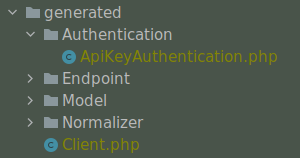
This AuthenticationRegistry class is used to match security scopes in your API, if an Endpoint require a certain
authentication method, then it will use it. You need to have security fields correctly made in your scheme in order
to use this class. If they're not set, you can simply pass the authentication plugin to your Jane Client.
Here is how you can use it:
$authenticationRegistry = new AuthenticationRegistry([new ApiKeyAuthentication($this->apiKey)]);
$client = Client::create(null, [$authenticationRegistry]);
$foo = $client->foo();
You can replace Client::create first argument with your custom HttpClient if needed as usual.
Custom operation naming
Client method names and endpoint class names are generated by implementations of
\Jane\Component\OpenApiCommon\Naming\OperationNamingInterface. By default, Jane uses the operation operationId
when available and falls back to URL-based naming. You can provide your own naming strategies with the
operation-namings option:
return [
  // your usual configuration ...
  'operation-namings' => [
    new \App\Jane\PrefixedOperationNaming('api'),
  ],
];
A single instance can also be provided directly instead of an array. Instances are consulted in order: when one
returns '', the next naming of the chain is used. If every naming returns '', generation fails, so you generally
want to end your chain with the built-in namings (\Jane\Component\OpenApiCommon\Naming\OperationIdNaming,
\Jane\Component\OpenApiCommon\Naming\OperationUrlNaming) which provide the default behavior as fallback.
Here is an example implementation prefixing every non-GET operation:
namespace App\Jane;

use Jane\Component\JsonSchema\Generator\Naming;
use Jane\Component\OpenApiCommon\Guesser\Guess\OperationGuess;
use Jane\Component\OpenApiCommon\Naming\OperationNamingInterface;

class PrefixedOperationNaming implements OperationNamingInterface
{
  public function __construct(
    private readonly string $prefix,
    private readonly Naming $naming = new Naming(),
  ) {
  }

  public function getFunctionName(OperationGuess $operation): string
  {
    if ('GET' === $operation->getMethod()) {
      return ''; // defer GET operations to the next naming of the chain
    }

    return lcfirst(str_replace(' ', '', ucwords($this->prefix . ' ' . str_replace('/', ' ', $operation->getPath()))));
  }

  public function getEndpointName(OperationGuess $operation): string
  {
    if ('GET' === $operation->getMethod()) {
      return '';
    }

    $className = str_replace(' ', '', ucwords($this->prefix . ' ' . str_replace('/', ' ', $operation->getPath())));

    // make sure we do not generate a class named after a PHP reserved word
    return $this->naming->fixReservedClassName($className);
  }
}
When writing your own naming strategy, keep the following contract in mind:
- be deterministic and pure: called twice with the same operation, a naming must return identical results;
- be stateless: a naming instance may be reused for every operation of a specification (and even for several specifications);
- return valid PHP identifiers for method and class names, and try to keep them unique across the generated client (Jane additionally deduplicates colliding names with an incrementing suffix, but relying on it makes names depend on operation order);
- namings are OpenAPI version agnostic: when you need version specific data, detect the version through
instanceofchecks on$operation->getOperation().
Warning
Providing this option replaces the whole default naming chain: built-in fallbacks and guards (such as the
operationId fallback or PHP reserved word handling) only apply if you add the corresponding built-in namings at
the end of your chain.
Extending the Client
Some endpoints need sometimes custom implementation that were not possible to generate through the OpenAPI specification. Jane OpenAPI try to be nice with this and each specific behavior of an API call has been seprated into different methods which are public or protected.
As an exemple you may want to encode in base64 a specific query parameter of an Endpoint. First step is to create your own Endpoint extending the generated one:
namespace Vendor\Library\Generated\Endpoint;

use Vendor\Library\Generated\Endpoint\FooEndpoint as BaseEndpoint;
use Symfony\Component\OptionsResolver\Options;
use Symfony\Component\OptionsResolver\OptionsResolver;

class FooEndpoint extends BaseEndpoint
{
  protected function getQueryOptionsResolver(): OptionsResolver
  {
    $optionsResolver = parent::getQueryOptionsResolver();
    $optionsResolver->setNormalizer('bar', function (Options $options, $value) {
      return base64_encode($value);
    });

    return $optionsResolver;
  }
}
Once this endpoint is generated, you need to tell your Client to use yours endpoint instead of the Generated one. For that you can extends the generated client and override the method that use this endpoint:
namespace Vendor\Library\Generated;

use Vendor\Library\Generated\Client as BaseClient;
use Vendor\Library\Generated\Endpoint\FooEndpoint;

class Client extends BaseClient
{
  public function getFoo(array $queryParameters = [], $fetch = self::FETCH_OBJECT)
  {
    return $this->executePsr7Endpoint(new FooEndpoint($queryParameters), $fetch);
  }
}
Then you will need to use your own client instead of the generated one. To extends other parts of the endpoint you can look at the generated code.
Custom string formats
Jane support some strings format, but it can't support all of them because it's an open keyword.
You may want to serialize a property to an UUID, or have a specific datetime format for a field (a datetime format that
is not the same as the one configured with date-format or full-date-format.
To do so, you need to provide:
- while generating the client: an associative array for the key
custom-string-format-mapping - at runtime: one or more Normalizer (which implement
Symfony\Component\Serializer\Normalizer\NormalizerInterface)
Example
Configuration file:
return [
  'json-schema-file' => __DIR__ . '/json-schema.json',
  'root-class' => 'MyModel',
  'namespace' => 'Vendor\Library\Generated',
  'directory' => __DIR__ . '/generated',
  'custom-string-format-mapping' => [
    'uuid' => \Symfony\Component\Uid\UuidV4::class
  ]
];
Your OpenAPI schema:
openapi: "3.0.0"
info:
  version: 1.0.0
  title: Example
paths:
  /some-path:
   get:
     summary: Get something
     operationId: getSomething
     responses:
       '200':
          description: Expected response to a valid request
          content:
            application/json:
              schema:
                $ref: "#/components/schemas/Something"
components:
  schemas:
    Something:
      type: object
      required:
        - id
        - uuid
      properties:
        id:
          type: 'integer'
        uuid:
          type: 'string'
          # the following keyword is important
          format: 'uuid'
Usage of the generated client:
$client = \Vendor\Library\Generated\Client::create(
  $httpClient,
  [], // additional http client plugins
  // additional normalizers
  [
    new \Symfony\Component\Serializer\Normalizer\UidNormalizer()
  ]
);